
Learn how to invite new members to your Workspace and give them the right role for the level of access they need.
👥 How do I add a new user?
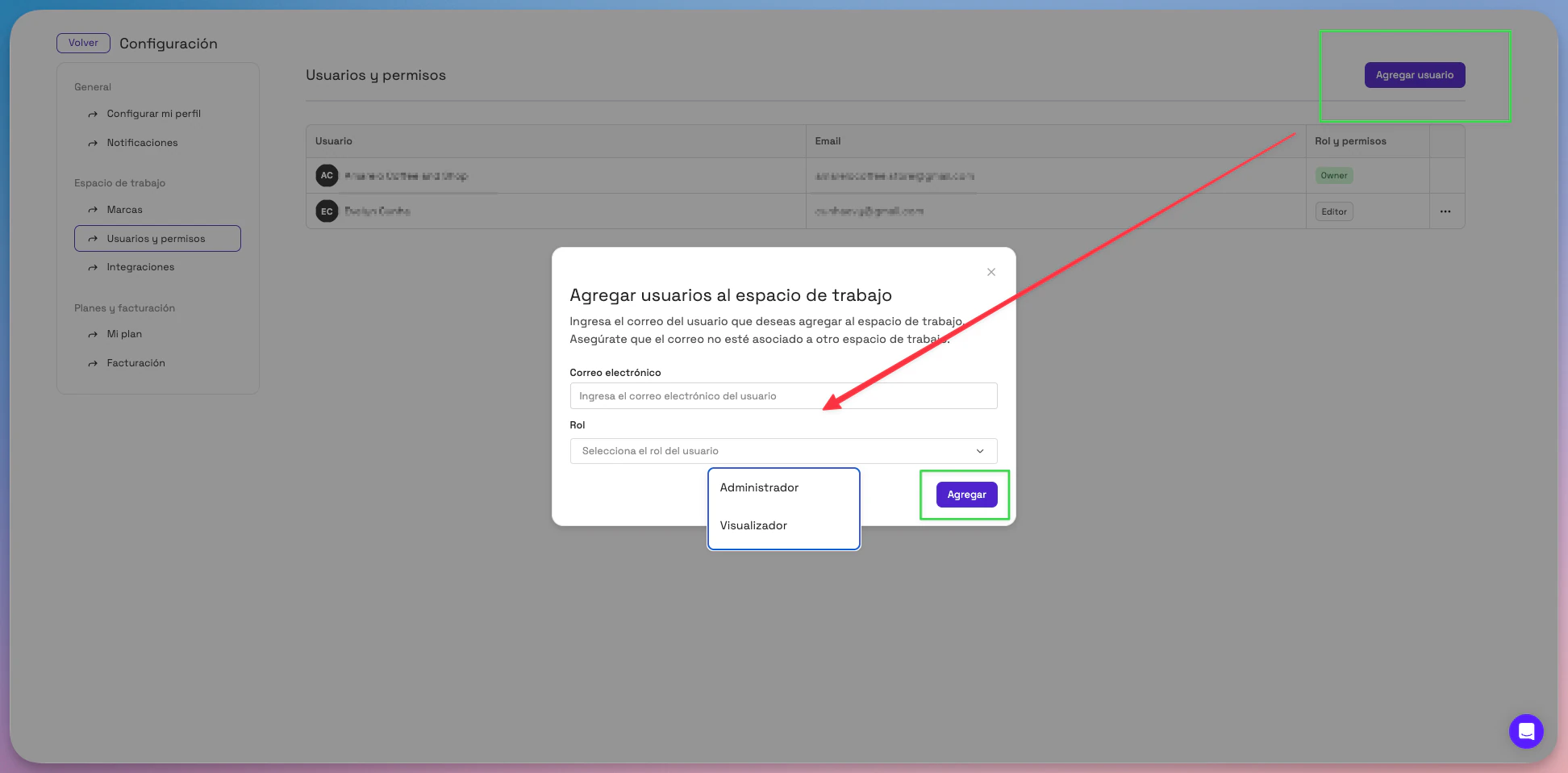
- Log in to Montu and click Settings ("Configuración") (bottom left).
- Select Users and permissions ("Usuarios y permisos").
- Click the Add user ("Agregar usuario") button.
- Enter the email address of the person you want to invite.
- Select the role they'll have in the Workspace:
- Admin ("Administrador")
- Viewer ("Visualizador")
- Click Invite ("Invitar") to finish.
🧑💼 Role types
-
Admin: Can do everything in the Workspace, except change the plan and payment methods.
-
Viewer: Can only view campaigns, creators and results. They can't make changes, create campaigns or contact creators.
🔑 How does the new user get access?
The user won't receive an automatic invitation email (for now). To get access:
- Go directly to center.montu.io.
- Log in with Google or Microsoft, using the same email address that was invited.
- Once they're in, they'll automatically see the Workspace they were invited to.
📌 Important: if the user tries to log in with an email address other than the one that was invited, they won't be able to access the Workspace.