
Learn how to remove an affiliate from your program in Montu. You can only remove an affiliate who has no commissions pending payment.
You can remove any affiliate from an active program in Montu, as long as they have no commissions pending payment. This action revokes their coupon, stops sales tracking and removes them from the program.
🧭 Step by step: remove an affiliate
- From the Dashboard, click the Affiliates ("Afiliados") section.
- Select the name of the program the affiliate you want to remove belongs to.
- Go to the My Affiliates ("Mis Afiliados") tab and click Manage ("Gestionar").
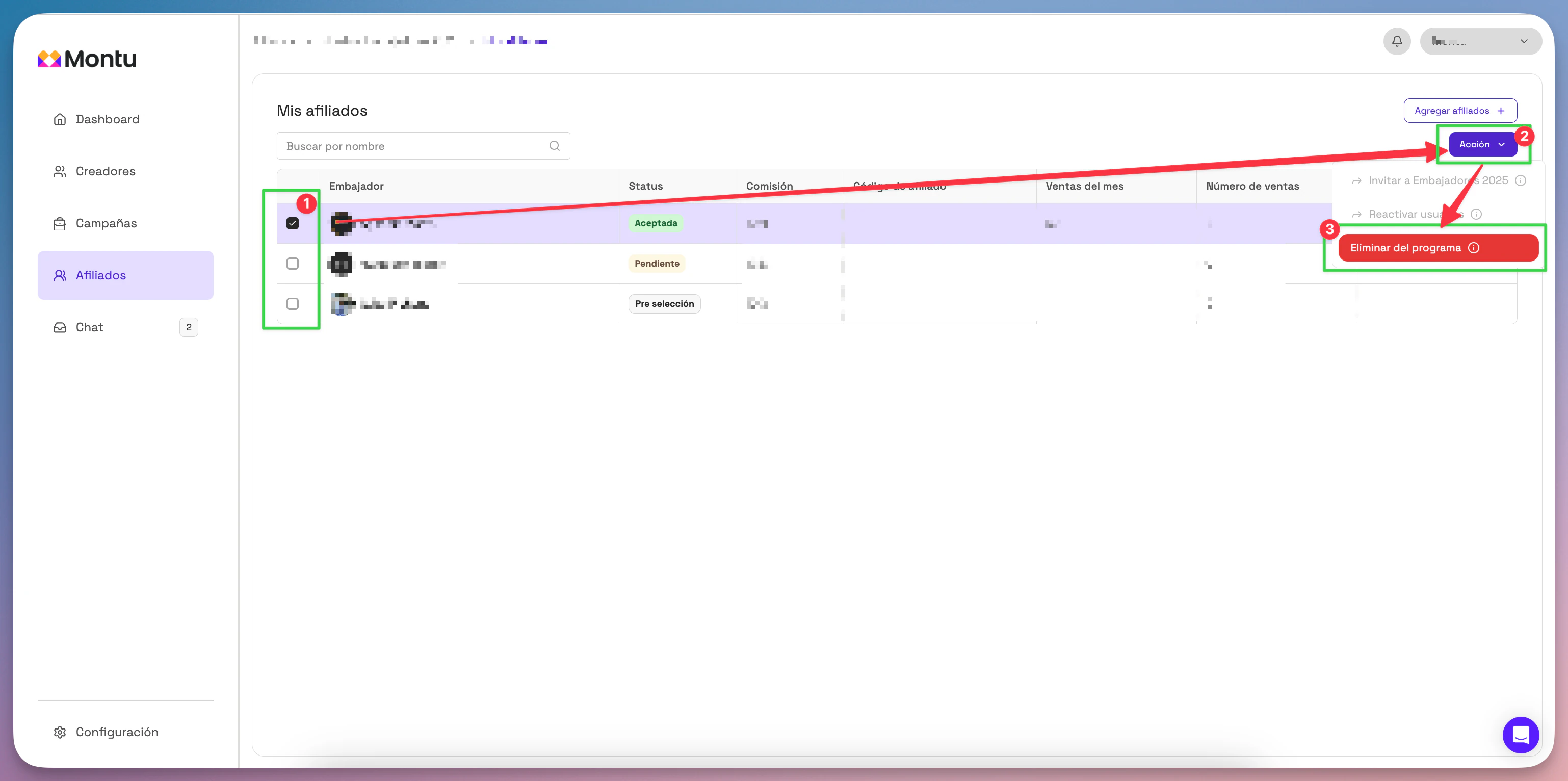
- Check the checkbox next to the affiliate you want to remove.
- Click the Action ("Acción") button and select Remove from program ("Eliminar del programa").
- Confirm in the pop-up by clicking Remove from program.
⚠️ Important
You can only remove an affiliate if:
- They have no commissions pending payment.
- Their status is Accepted ("Aceptado") or Pending ("Pendiente").
If the affiliate has pending commissions, you'll need to wait until they're paid before you can do this.